


5 min read
Many teams start their week the same way: recreating tasks, preparing meeting agendas, writing updates, or setting reminders for recurring work. These activities are essential for keeping projects on track, but manually repeating them every week takes time and introduces unnecessary friction.
Asana’s Scheduled Triggers feature helps solve this problem by automating recurring workflows based on time. Instead of manually creating tasks or reminders, teams can set automation rules that trigger automatically at scheduled intervals.
With Asana automation rules, recurring tasks, status updates, and follow-ups can run in the background - ensuring your processes stay consistent without requiring manual input.
In this article, we explore how Asana Scheduled Triggers work, how to set them up, and how they can improve productivity across your team.
What Are Scheduled Triggers in Asana?
Scheduled Triggers are part of Asana’s workflow automation and rules engine. They allow teams to trigger automated actions based on time rather than events.
Most automation rules in project management tools activate when something happens - for example, when a task is completed or assigned. Scheduled Triggers work differently. They activate at a predefined time or recurring interval, such as:
- Every Monday at 9am
- Every Friday afternoon
- The first day of each month
- Every 7 days
When the trigger activates, Asana automatically performs the action defined in the rule.
These actions might include:
- Creating a new task
- Drafting a status update using AI
- Assigning work to a team member
- Sending reminders
- Creating follow-up tasks
By automating these routine activities, teams can focus on meaningful work instead of administrative tasks.
Why Recurring Work Slows Teams Down
Recurring processes are common in most organisations. Weekly meetings, reporting cycles, and regular project reviews all require preparation.
However, manually repeating these tasks introduces several challenges:
- Time lost on administrative work
- Important tasks being forgotten
- Inconsistent processes across teams
- Last-minute status updates or reporting
Even small recurring tasks add up quickly when repeated every week across multiple teams.
This is where Asana workflow automation becomes valuable. By using Scheduled Triggers, teams can automate recurring work and ensure critical processes run reliably.
Real Examples of Asana Scheduled Triggers
Scheduled Triggers can support many common team workflows inside Asana. Here are three practical examples.
Automating Weekly Meeting Agendas
Many teams hold weekly meetings such as stand-ups or one-to-one check-ins. These meetings typically require the same preparation every week.
Using Asana Scheduled Triggers, a rule can automatically create a task every Monday at 9am titled “Prepare Weekly Stand-Up Agenda”.
This ensures the task appears at the right time each week without anyone needing to remember to create it.
Automatically Drafting Weekly Status Updates
Project status updates are vital for leadership visibility, but they are often written at the last minute.
With Asana automation, teams can schedule a trigger that runs every Friday afternoon. The rule can generate a draft project status update using Asana AI, providing a starting point that team members can quickly review and finalise.
Instead of rushing to write updates at the end of the day, the process becomes structured and predictable.
Creating Monthly Follow-Up Tasks
Some processes occur monthly rather than weekly, such as reviewing project goals or updating portfolio metrics.
An Asana Scheduled Trigger can automatically create a follow-up task on the first day of each month, ensuring these activities never fall through the cracks.
Automation ensures consistency while reducing reliance on calendar reminders.
The Productivity Impact of Asana Workflow Automation
Automation features like Scheduled Triggers can have a significant impact on team productivity.
Research across digital workplaces consistently shows that repetitive administrative tasks consume a substantial portion of employees’ time.
For example:
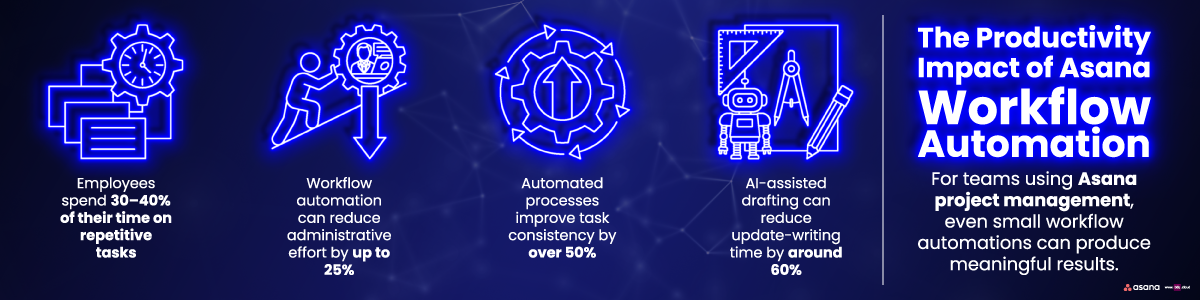
- Employees spend 30–40% of their time on repetitive tasks
- Workflow automation can reduce administrative effort by up to 25%
- Automated processes improve task consistency by over 50%
- AI-assisted drafting can reduce update-writing time by around 60%
For teams using Asana project management, even small workflow automations can produce meaningful results.
If a weekly task that normally takes five minutes to create is automated, that small improvement compounds across the team over time.
How to Set Up Scheduled Triggers in Asana
One of the advantages of Asana automation is how easy it is to configure.
Follow these steps to set up Scheduled Triggers within an Asana project.
1️⃣ Create a New Rule
Within your project, open the Customise menu and select Rules.
Click "“ Create Rule” to start building a new automation workflow.
2️⃣ Select the Scheduled Trigger
Choose “Scheduled time occurs” as the rule trigger.
This allows the rule to activate at a specific time rather than in response to a task event.
3️⃣ Define the Schedule
Next, define when the automation should run.
For example:
🔹Monday at 9am
🔹Every Friday at 3pm
🔹Every 7 days
🔹Monthly on the first day
This schedule determines when the rule will activate.
4️⃣ Choose the Action
Finally, select what the rule should do when triggered.
Common actions include:
🔹Create a task
🔹Draft a project update with Asana AI
🔹Assign tasks to team members
🔹Add subtasks or reminders
Once saved, the rule runs automatically going forward.
Best Practices for Using Asana Scheduled Triggers
To get the most value from Asana automation, it helps to apply a few best practices.
Start with repetitive tasks
Identify processes that happen weekly or monthly.
Keep rules simple
Simple workflows are easier to manage and maintain.
Use automation to improve visibility
Automated tasks ensure everyone knows what needs to happen and when.
Review workflows regularly
As projects evolve, automation rules may need adjustment.
When used effectively, Scheduled Triggers help teams reduce manual work and maintain consistent workflows.
Why Automation Matters for Modern Teams
As organisations increasingly rely on digital collaboration tools, workflow automation has become a key productivity driver.
Features like Asana rules, AI-powered updates, and scheduled automation enable teams to reduce administrative overhead and focus on strategic work.
Instead of manually recreating the same tasks every week, teams can build processes that run automatically.
The result is a more efficient workflow, fewer missed tasks, and better project visibility across the organisation.
Ready to Get More from Asana?
If your team is still manually creating recurring tasks, reminders, or status updates in Asana, Scheduled Triggers could transform how your workflows operate.
Automation ensures recurring work happens on time, every time - without adding to your team’s workload.
If any of the challenges discussed in this article sound familiar, get in touch with us today. Our team can help you unlock the full potential of Asana automation and design workflows that save time and improve productivity across your organisation.

Related Posts
The Rise of the 'Ghost Shift' and What IT Teams Can Do About It
For many organisations, the traditional 9-to-5 working day is no longer the norm.
Whether it's...
What is RPA and how it can help you?
One of the fastest-growing sectors of IT nowadays is Robotic Process Automation, shortened to RPA....
Incident Management Migration: Reduce Risk and Improve ITSM
If your organisation has been considering an incident management migration, you are definitely not...