

Help Desk Migration, · Blog · 30 August 2026
Help Desk Vendor Lock-In: Is It Really Hard to Switch?
Help desk vendor lock-in can make switching feel risky. Learn what creates lock-in and how to plan a smoother ITSM migration.
Migration
ITSM
Automation
Customer stories across migration, ITSM, work management and automation.
All success stories →Help Desk Migration, · Blog · 30 August 2026
Help desk vendor lock-in can make switching feel risky. Learn what creates lock-in and how to plan a smoother ITSM migration.
There’s a familiar point in the life of many help desk and ITSM platforms.
The system that once seemed like a good fit starts becoming restrictive. Perhaps costs have increased. Perhaps reporting or automation no longer meets your needs. Or perhaps another platform offers capabilities - including new AI features - that would be genuinely useful to your team.
Yet switching still feels like a very big decision.
Often, that's because organisations aren't simply thinking about replacing some software. They're wondering what happens to years of tickets, attachments, knowledge articles, workflows, integrations and reporting if they move.
That's where help desk vendor lock-in becomes important.
TL;DR
Vendor lock-in isn’t just contracts. Data, integrations, workflows, reports and how people work can all make an ITSM platform hard to leave.
Good news: migration needn't be insurmountable. Modern tools can automate much of help-desk data transfer, and careful discovery, configuration, testing, and training handle operational change.
So the key question isn’t only “Can we move our tickets?”
It’s “How do we move our service operation successfully?”
At its simplest, vendor lock-in happens when changing software becomes sufficiently difficult, expensive or risky that an organisation remains with its existing platform even when it would prefer to move.
The recent Help Desk Migration guide to vendor lock-in describes five broad areas where this dependency develops: contracts, data, integrations, code and people.
That last point is particularly easy to overlook.
A service desk isn't just a database containing tickets. Over time, your organisation builds ways of working around it.
You might have:
years of ticket history and attachments;
custom fields and forms;
a multilingual knowledge base;
SLAs and escalation rules;
integrations with other business systems;
automations and workflows;
management dashboards and KPIs;
users who know exactly how to get things done.
So even if exporting the tickets themselves is straightforward, that's only part of the migration.
The amount of historical data stored in an established service desk can make migration sound intimidating.
However, specialist migration technology has changed what is possible.
Help Desk Migration says it has completed more than 50,000 migrations since 2016 and currently supports migrations across more than 90 help desk and ITSM platforms. Its tooling can automate the movement of information such as tickets, history and attachments.
Its LinkedIn post gives an interesting example: a 75-agent organisation with approximately 370,000 tickets and five years of history, where the data migration itself was estimated at around $5,000. That's Help Desk Migration's example rather than a BDQ project, but it illustrates an important point: a large volume of historical data doesn't automatically make changing platforms prohibitively expensive.
The harder question is usually what happens around that data.
 A migration is more than moving tickets
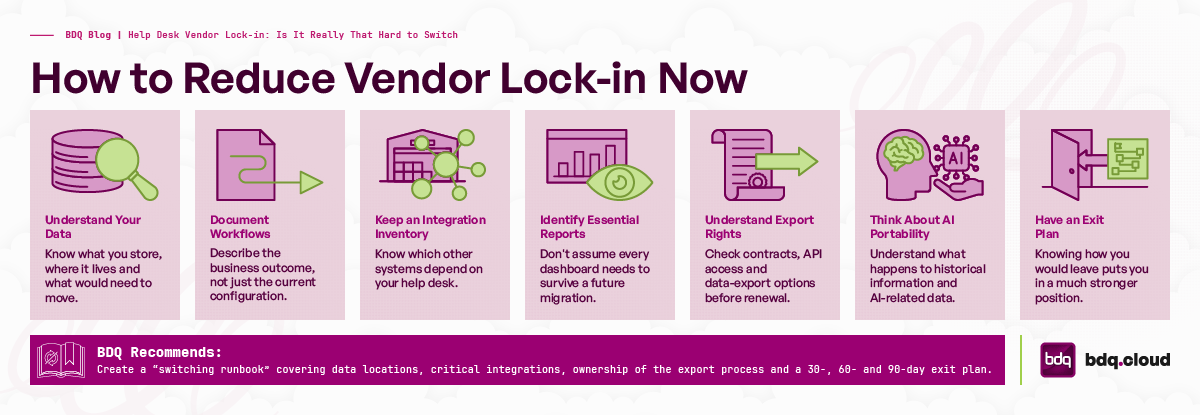
Imagine moving house.
Getting your possessions from one building to another is essential, but you probably don't want the new house arranged as an exact replica of the old one.
An ITSM migration deserves the same thinking.
Different platforms structure fields, workflows, automations, reports and integrations differently. Help Desk Migration highlights custom fields as a common cause of migration overruns and recommends defining mapping and transformation rules before migration begins.
This is also why simply recreating the old service desk exactly as it was can be a missed opportunity.
If you're considering a new platform, start by asking what you actually want the new service operation to achieve.
Which processes still work well? Which ones exist mainly because of limitations in the current platform? Which reports does management genuinely use? Which automations save time? Which integrations remain business-critical?
Those questions help separate the things worth migrating from the things worth redesigning.
Some parts of an ITSM environment aren't simply portable objects.
Automations, for example, may need to be recreated because platforms implement them differently. The same is true of SLA policies and many integrations. Help Desk Migration recommends documenting operational policies in plain language and creating an inventory of integrations before starting the migration.
That's useful advice because it shifts the conversation away from "How do we copy this configuration?" towards "What is this configuration supposed to accomplish?"
Once you understand the required outcome, you can determine the best way of achieving it in the destination platform.
Reporting is another area that's easily underestimated.
The underlying information might migrate successfully, but dashboards and KPI calculations don't necessarily travel with it. Different service management platforms can calculate measures such as Mean Time to Resolution differently.
Before moving, identify the reports and KPIs that actually matter to the organisation.
This can be an opportunity to improve rather than simply reproduce existing reporting.
We've seen the importance of this in BDQ's Jira Service Management work. For example, The Wine Society wanted better visibility into IT requests and the information required to make decisions about priorities and resources. Following its JSM implementation, it gained real-time dashboards and tailored management reporting.
In other words, migration can be a chance to ask whether you're collecting and presenting the right information, rather than automatically carrying every legacy report forward.
AI adds a relatively new dimension to vendor lock-in.
Modern service platforms can learn from large volumes of support conversations, knowledge content and operational information. That makes historical data potentially more valuable than it was when it was simply an archive.
But it can also deepen dependency on a platform.
Help Desk Migration points out that while underlying support information may be exportable, learned AI behaviour, configuration and model state may not move with it. Its recommendation is to think about AI training information as a portable asset rather than something that only matters inside the current service platform.
That's a useful consideration when evaluating a new ITSM platform.
Don't just ask, "What AI features does it have today?"
Ask how those capabilities use your data, what information can be exported, and what would happen if your AI strategy - or service management platform - changed again in three years.
Even a technically flawless migration can struggle if nobody likes using the new system.
People become familiar with particular screens, queues, shortcuts and processes. Managers become accustomed to particular dashboards. Administrators learn how their platform behaves.
Changing platforms means changing some of those habits.
That's why user acceptance testing, training and adoption should be part of the migration plan rather than something added at the end.
BDQ's own migration methodology reflects this. Our approach combines discovery and planning with prototypes, testing, training and implementation, so users and stakeholders can see and validate the new environment before it becomes their day-to-day system.
This becomes particularly important for complex migrations. In BDQ's Rainforest Alliance project, for example, the organisation was moving a mission-critical Confluence environment with more than 1,000 users and hundreds of gigabytes of data. The approach included trial migrations, user acceptance testing and training while aiming to minimise disruption to the live environment.
The technology matters, but so does confidence in the change.
You don't have to be planning an immediate migration to make your organisation more portable.
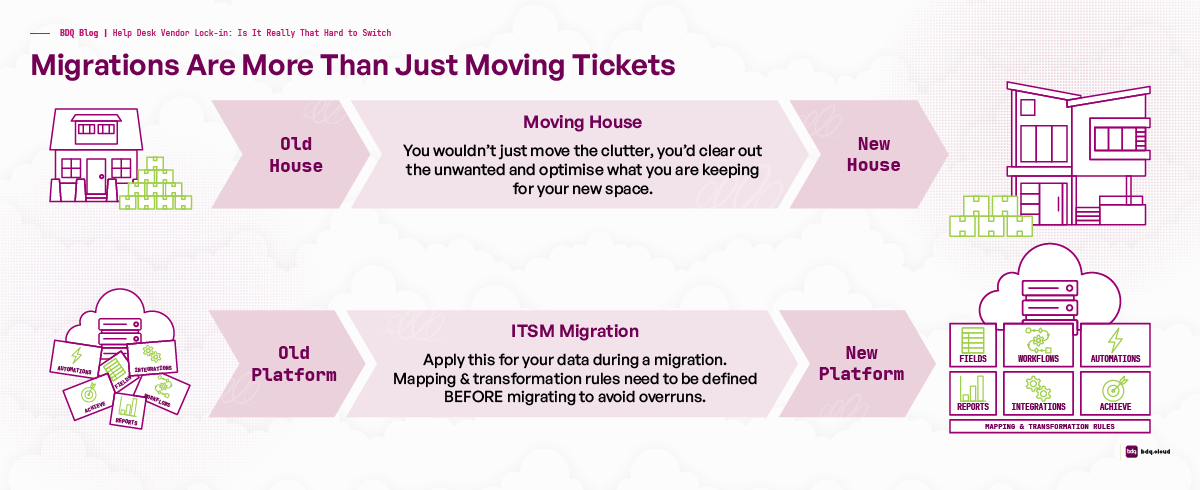
A few sensible housekeeping measures can make future decisions much easier:
Understand your data. Know what you store, where it lives and what would need to move.
Document important workflows and SLAs. Describe the business outcome, not just the current configuration.
Keep an integration inventory. Know which other systems depend on your help desk.
Identify essential reports and KPIs. Don't assume every dashboard needs to survive a future migration.
Understand your export rights. Check contracts, API access and data-export options before renewal rather than after deciding to leave.
Think about AI portability. Understand what happens to historical information and AI-related data if you switch.
Have an exit plan. Even if you're happy with your current platform, knowing how you would leave puts you in a much stronger position.
Help Desk Migration goes further and recommends creating a switching runbook covering data locations, critical integrations, ownership of the export process and a 30-, 60- and 90-day exit plan.
That's useful advice for almost any business-critical SaaS application.
Perhaps the most useful way to think about vendor lock-in is this:
Your current platform should keep your business because it continues to meet your needs - not because moving away feels impossible.
If you're happy with your help desk, there's no reason to migrate simply for the sake of it.
But if the platform is limiting your reporting, automation, integrations, user experience or ability to take advantage of newer technology, it's worth establishing what switching would actually involve rather than assuming it will be too difficult.
The full Help Desk Migration vendor lock-in guide is worth reading if you'd like to explore the subject in more depth, particularly its sections on contract clauses, data portability, AI and migration planning.
And if you're evaluating the ITSM side of that decision, you can also explore BDQ's ITSM and Enterprise Service Management services or our Jira Service Management implementation services. BDQ specialises in ITSM and work management solutions and provides consultancy, integration, development, training and support.
The important thing is to make the decision based on where your service organisation needs to go next - rather than being constrained by where its data happens to live today.
Book a 30-min consult
Tell us roughly what you’re facing. We’ll come back within one business day with thoughts, references, and a sense of whether we’re a good fit.
Keep reading
Cherwell end of life is 31 December 2026. Learn what happens next, compare Cherwell alternatives and plan a fast, low-ri
Read article →Atlassian is rolling out usage-based pricing for AI and automation from December 2026. Here's what's changing, what it c
Read article →Help desk vendor lock-in can make switching feel risky. Learn what creates lock-in and how to plan a smoother ITSM migra
Read article →We use cookies to keep the site working and to power features like our live chat. Analytics are cookieless. See our privacy policy.