
Atlassian, · Blog · 7 September 2026
Atlassian's New Usage-Based Pricing: What It Means for You
Atlassian is rolling out usage-based pricing for AI and automation from December 2026. Here's what's changing, what it costs, and how to prepare.
Atlassian, · Blog · 7 September 2026
Atlassian is rolling out usage-based pricing for AI and automation from December 2026. Here's what's changing, what it costs, and how to prepare.
If you're an Atlassian admin, you've probably already had an email (maybe the same one that led you here) about a change to how Jira, Confluence, and the rest of the Atlassian suite are priced. It's easy to read "pricing change" and brace for bad news, so let's walk through what's actually happening, in plain terms.
From 1 September 2026, Atlassian is layering usage-based pricing on top of its existing seat-based plans, covering things like Rovo AI credits, automation steps, Assets objects, AI agent resolutions, and some Bitbucket capabilities.
Every eligible plan still comes with a built-in allowance at no extra cost - you only pay more if you go beyond it.
The biggest practical shift is for Enterprise customers: automation moves from unlimited to a pooled, metered allowance for the first time.
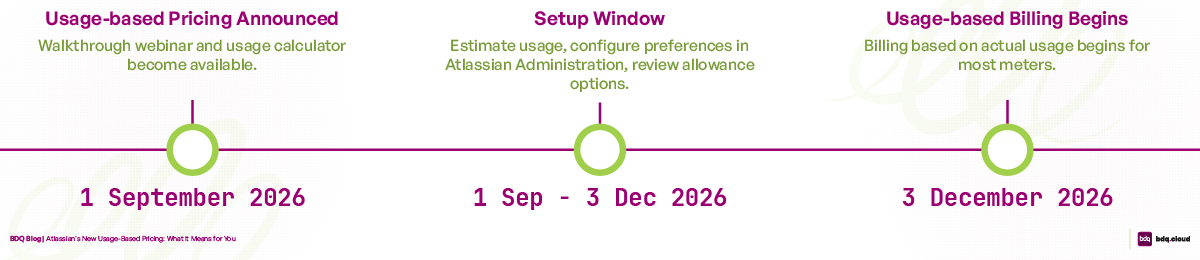
Billing for most meters kicks in on 3 December 2026, giving admins a three-month window to check their usage and get set up.
You can track everything in real time through Atlassian Administration, and you'll get alerts at 80% and 100% of your allowance before anything changes.
The best first step is to log in, check where you stand, and specifically look at any automation rules that branch, loop, or run often - those are the ones most likely to eat into your allowance.
Update — 21 September 2026: A reader asked whether Enterprise customers on an active agreement are protected from usage-based billing until their next renewal. We looked into Atlassian's actual contract terms: the general Customer Agreement says most modifications "take effect at the next Order or renewal," but the separate usage-based offering terms reserve the right to update usage-based rates "from the effective date of the change onward" — and neither document says which rule applies when an account moves from no metering to being metered for the first time. If you're mid-term on an Enterprise agreement, this is worth confirming directly with your Atlassian account team rather than assuming either way.
-BDQ
Atlassian isn't replacing seat-based pricing - your per-user licence fees for Jira, Confluence, and so on work the same way they always have. What's new is a second layer sitting on top of that, specifically for the parts of the product that scale with usage rather than with headcount: AI features, automation, and object storage in Assets, among others.
That distinction matters because these capabilities don't map neatly onto "per seat" pricing. One person on your team might run a handful of Rovo AI queries a month; another might lean on automation rules and AI agents constantly. Metering lets Atlassian price those features based on how much they're actually used, rather than folding an average cost into everyone's seat price regardless of whether they touch AI or automation at all.
Every eligible plan comes with a substantial built-in allowance as part of the subscription, so this isn't a case of "pay per click" from day one. You're only billed for extra usage if you go beyond what's included - and even then, you're in control of whether that's allowed to happen automatically or not (more on that below).
The one group this changes more meaningfully for is Enterprise customers. Atlassian's own automation licensing FAQ confirms that "Enterprise plans will no longer have unlimited automation. Instead, they receive pooled allowances designed to cover typical Enterprise usage patterns." Atlassian hasn't published the exact step-count tiers for each plan yet, so if you're on Enterprise, checking your current automation volume against the new allowance is worth doing early rather than assuming "unlimited" still applies.
 What's actually being metered
Here's the practical breakdown, based on Atlassian's own documentation:
Rovo credits - cover AI features across Atlassian products, plus certain Teamwork Graph API calls. Basic AI features, like Quick Answer mode in Rovo Chat and standard Rovo Agents, use a flat 10 credits per invocation. More intensive features (Think Deeper mode, Confluence slide generation, the Jira Coding Agent) use a variable number of credits depending on the compute involved. Handy exception: embedded AI features like Summaries and Definitions stay free.
Automation steps - billed per step executed in your automation rules. More on exactly what counts as a "step" below, since it's not as simple as one charge per rule run.
Assets objects - billed per business object stored across the Service and Teamwork Collections.
AI agent resolutions - for Customer Service Management, billed per successful autonomous resolution.
Bitbucket - covers build minutes, Git LFS storage, and package storage/network usage.
Which of these apply to you depends on your products. Jira, Confluence, Jira Product Discovery, and the Teamwork and Service Collections each pull in a different combination - Atlassian's usage-based pricing FAQ has the full breakdown by product.
This is worth its own section, because it changes what you should go and check before December. Automation isn't billed per rule run - it's billed per step, and Atlassian counts triggers, conditions, actions, branches (if/else), and loop iterations all separately. A single rule run can rack up several steps if it branches into different paths or loops over a set of items, and each pass through the loop counts on its own.
It's also worth knowing that a step doesn't have to succeed to count. According to Atlassian's usage calculation documentation, steps are charged for SUCCESS, NO_ACTIONS_PERFORMED, SOME_ERRORS, ABORTED, and even NO_MATCH outcomes - so a trigger that fires but doesn't find a match still uses up one step. The exception is THROTTLED runs, where the automation never actually executes; those don't count.
In practice, this means the rules most likely to consume your allowance quickly aren't necessarily your busiest ones - they're the ones that branch a lot, loop over growing lists of items, or run on a frequent schedule regardless of whether they find anything to do. That's exactly what's worth auditing first (see the checklist below).
Atlassian introduces some new vocabulary alongside this change, and it's worth having these straight before you start digging into your own usage data:
Meter - tracks your organisation's use of a specific capability (say, Rovo credits) against your included allowance.
Allowance - the usage included in your plan at no extra cost. Allowances pool across your whole organisation and refresh every monthly billing period.
Extra usage - anything above your allowance. It's enabled by default, and billed in arrears based on what you actually used.
Usage pack - a block of extra capacity you buy in advance at a fixed rate, to top up your monthly allowance.
Committed pack - an annual prepaid balance you can draw down flexibly across the year (coming soon).
Atlassian has published rates for two of the five meters so far:
Meter | Included Allowance | Overage Rate |
|---|---|---|
Rovo credits | 25 / 70 / 150 credits per user/month | $0.01 per credit |
Rovo credits | 250 / 700 / 1,500 credits per user/month | $0.01 per credit |
Automation steps | Varies by plan and product, pooled at org level | $0.50 per 1,000 steps |
Source: Atlassian's Rovo licensing FAQ and automation licensing FAQ. Assets objects, AI agent resolutions, and Bitbucket usage are also billed based on consumption, but Atlassian hasn't published flat per-unit rates for those the way it has for Rovo and automation - check the relevant meter-specific FAQ for your products closer to December.
Key dates
Date | What happens |
|---|---|
1 September 2026 | Usage-based pricing is announced; a walkthrough webinar and usage calculator become available |
1 September – 3 December 2026 | Setup window: estimate your usage, configure preferences in Atlassian Administration, and look at allowance options |
3 December 2026 | Billing based on actual usage begins for most meters (timing can vary slightly depending on the capability and your billing cadence) |
Three months is a reasonably generous runway, and it's worth using it - not because most organisations will be caught out, but because it's the difference between reacting to a surprise and planning around a known change.
If your organisation goes over its included allowance and extra usage is left on (the default setting), things simply keep working - you're billed for the extra usage at the published rate, in arrears. Nothing grinds to a halt.
If you'd rather not risk overage charges, you can turn extra usage off for specific meters. In that case, only the exhausted meter pauses - so if you hit your Rovo credit limit, automation and Assets keep running normally. It resumes automatically once the allowance refreshes the following month, or once you add more capacity.
Either way, you're not left guessing: organisation and billing admins get notifications at 80% and 100% of the allowance (and any custom limits you've set), so there's fair warning before anything changes.
All of this is manageable through Atlassian Administration (admin.atlassian.com), under Insights → Platform usage. From there you can:
See usage broken down by app and by time period, in real time
Look at historical trends to forecast where you're heading
Turn extra usage on or off per meter
Set your own usage ceilings, separate from the built-in allowance
Atlassian has also published a usage calculator to help you estimate where your organisation is likely to land before billing kicks in, which is a reasonable place to start if you haven't looked yet.
 How to prepare, practically speaking
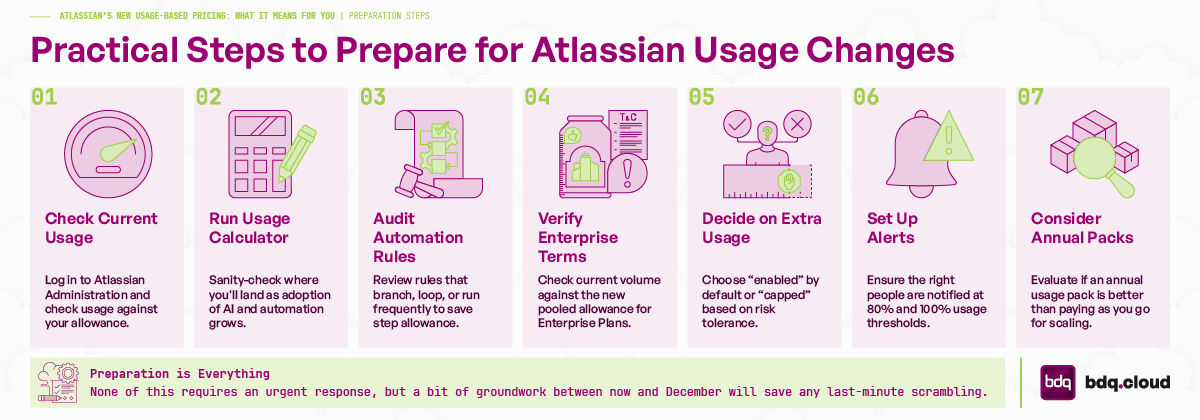
None of this requires an urgent response, but a bit of groundwork between now and December will save any last-minute scrambling:
Log in to Atlassian Administration and check your current usage against your allowance for each meter that applies to you.
Run your numbers through the usage calculator to sanity-check where you're likely to land as adoption of AI and automation grows.
Audit your automation rules - specifically the ones that branch into multiple paths, loop over lists, or run on a frequent schedule regardless of whether they find matches. These will consume your step allowance fastest, since every branch, loop iteration, and even a "no match" trigger counts as a step.
If you're on an Enterprise plan, don't assume "unlimited automation" still applies - check your current volume against the new pooled allowance as soon as Atlassian publishes the specific tiers for your products.
Decide, meter by meter, whether you want extra usage enabled by default or capped - this is really a conversation about risk toleraRence versus continuity.
Set up alerts (or check the defaults) so the right people get notified at 80% and 100%, not just the admin who happened to set up the account.
If your organisation is scaling up AI or automation use quickly, it's worth looking at whether an annual usage pack makes more sense than paying for extra usage as you go.
Usage-based pricing is Atlassian's way of matching cost to how much AI, automation, and storage capability your organisation actually consumes, rather than baking an average into everyone's seat price. For most teams, the built-in allowances will cover normal usage comfortably, and the tools to monitor and control spend are already there in Atlassian Administration. The one change worth flagging clearly is that Enterprise customers are losing unlimited automation, so that's the first thing worth checking if that applies to you. Beyond that, the sensible move is simply to check where you stand - and audit your busiest or most complex automation rules - before December, rather than finding out after the fact.
If you want a second pair of eyes on what this means for your specific setup, that's exactly the kind of thing an Atlassian partner can help you model out - get in touch with our team, and we'll help you make sense of your own usage data.
Book a 30-min consult
Tell us roughly what you’re facing. We’ll come back within one business day with thoughts, references, and a sense of whether we’re a good fit.
Keep reading
Plan a ServiceNow migration to Jira Service Management or HaloITSM with a realistic, phase-by-phase timeline, from disco
Read article →The licence price is only part of the story. Learn how to assess the true lifecycle cost of an ITSM platform, from prici
Read article →Cherwell end of life is 31 December 2026. Learn what happens next, compare Cherwell alternatives and plan a fast, low-ri
Read article →We use cookies to keep the site working and to power features like our live chat. Analytics are cookieless. See our privacy policy.