

Skip to content
Atlassian Marketplace · Jira Service Management

Easy Email Attachments for Service Desk

Real attachments in JSM notification emails — no more portal links.

Easy Email Attachments for Service Desk is a drop-in replacement for the notification emails Jira Service Management Server sends when comments are added or edited. The emails include the comment attachments as real email attachments rather than links back to the portal, so customers get the files the way they expect them.

  • Real email attachments instead of portal links
  • Works for users behind the firewall sending to external customers
  • Easy to set up — running in minutes
  • Configured per Service Desk project
  • No change to the agent comment interface
easy-email-attachments-logo.webp logo

Overview

The Easy Email Attachments for Service Desk app by BDQ is a drop-in replacement for notification emails when comments are added or edited in Atlassian's Jira Service Management Server. The emails sent by the app include the attachments added to those comments as email attachments, rather than links to the Jira Service Management portal.

Easier email conversations, faster resolutions, and customers do not have to remember yet another login.

*Video may contain references to Jira Service Desk instead of Jira Service Management.

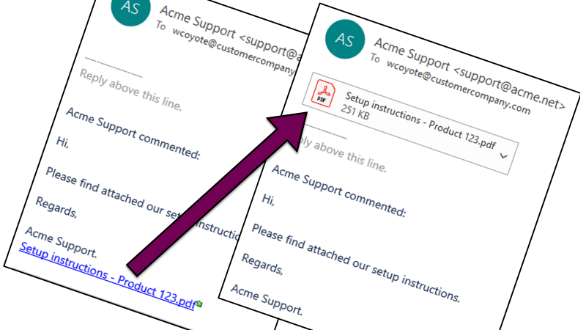
Email attachments instead of links!

Customers receive real attachments in their email clients - no more portal links! Notifications work as customers expect, and Jira instances behind the firewall can send attachments to external users.
highlight1_cropped

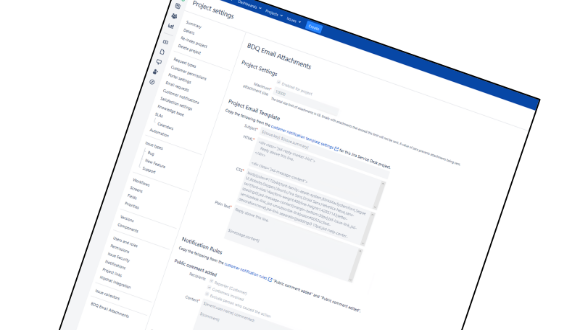
Easy to setup

Get up and running in minutes - easy to trial. Simply copy and paste the current configuration. Configuration is done within the Project Settings page for each Service Desk project.
highlight2_cropped

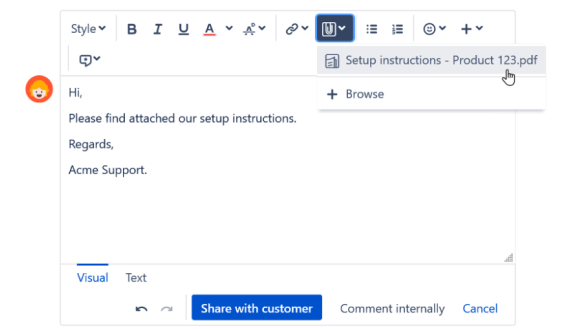
Agents work as usual

There are no changes to Jira Service Management's comment interface. Agent's can drag in issue attachments as normal, and no additional training is required.
highlight3_cropped

Getting Started

Installing, setting up and using Easy Email Attachments for Service Desk is a breeze. But incase you have concerns, we recorded a short video to help you.

You can also use the link below to review the "Getting Started" documentation.
documentation-icon-200x200

Getting Started summary

*Video may contain references to Jira Service Desk instead of Jira Service Management.

Easy Email Attachments for Service Desk

Easy to trial - get 30 days free when you download from the Atlassian Marketplace

App support & resources

Need a hand? Raise a ticket via the BDQ Support Portal, explore Managed Support for flexible expert help, or read more customer stories.

Screenshots

See it in action.

Screenshot Screenshot Screenshot
/ 3

Frequently asked

Common questions.

What does the app replace?

It is a drop-in replacement for the notification emails Jira Service Management Server sends when comments are added or edited, so that those emails carry the attachments as files rather than portal links.

Does it work for instances behind a firewall?

Yes. Because the files are sent as real email attachments, Jira instances behind the firewall can deliver attachments to external users who could not otherwise reach the portal.

Do agents have to change how they work?

No. There are no changes to the comment interface. Agents drag in issue attachments as usual and no extra training is needed.

How is it configured?

Configuration is done from the Project Settings page for each Service Desk project. You can copy and paste your current configuration to get started in minutes.

Documentation

Guides & reference for Easy Email Attachments for Service Desk.

All documentation →

(4.2.0) Support

Our standard business hours are Monday to Friday, 09:00 - 17:00 UK time (current time via Time.is). We are clo

Read →

(4.2.0) Settings reference

See Configuring the settings for a step-by-step guide on how to copy the settings over.

Read →

(4.2.0) No notifications are being sent

Ensure that the email is set up and configured in Jira itself and that the standard notifications for Jira Ser

Read →

(4.2.0) Enabling logging

To temporarily enable logging for the app, please follow these steps:

Read →

(4.2.0) Licensing

When you install a trial version of the app a 30-day evaluation license is available. To continue using the ap

Read →

(4.2.0) Frequently asked questions

If you are having problems with the app, please try these steps first to ensure that the Jira Service Manageme

Read →

(4.2.0) Configuration

Read →

(4.2.0) Character set encoding

If you are working with non-Latin1 character sets (for example, Cyrillic, Czech, Hungarian, etc.) it is recomm

Read →

(4.2.0) Two notification emails when comments are added or edited

Please see Configuring the settings and make sure that step 5 has been followed for Public comment added and s

Read →

(4.2.0) Prerequisites

Before starting make sure that the following prerequisites are installed, configured and working:

Read →

(4.2.0) Getting started

Before starting make sure that the following prerequisites are installed, configured and working:

Read →

(4.2.0) Troubleshooting

Please see Configuring the settings and make sure that step 5 has been done for Public comment added and step

Read →

(4.2.0) Acknowledgements

BDQ acknowledges the use of the following open source component(s) in Easy Email Attachments for Service Desk.

Read →

(4.2.0) Installation

There are two functionally equivalent versions of app, please use the correct one for your version of Jira / J

Read →

(4.2.0) Example settings for English

${issue.key} ${issue.summary}HTML<div class="jsd-reply-marker-hint"> Reply above this line. </div>

Read →

(4.2.0) Marketplace installation

The easiest way to install the add-on is to use the Universal Plugin Manager (UPM). This component of JIRA all

Read →

(4.2.0) Introduction

Video overview of the app.

Read →

(4.2.0) Project settings form

The app is configured within the Project settings form for a specific Jira Service Management project.

Read →

(4.2.0) Configuring the settings

The following video walks through how to configure the settings.

Read →

Book a 30-min consult

Need a custom build or volume licensing?

Tell us roughly what you’re facing. We’ll come back within one business day with thoughts, references, and a sense of whether we’re a good fit.

  • Free, no obligation
  • Direct line to a senior consultant
  • Honest assessment — we’ll say no if it’s not a fit

We respond within one business day. No spam, ever.

Get started

Try it free.
No credit card.

We use cookies to keep the site working and to power features like our live chat. Analytics are cookieless. See our privacy policy.