

Blog · 20 October 2026
Moving From ServiceNow to JSM or HaloITSM: A Realistic Timeline
Plan a ServiceNow migration to Jira Service Management or HaloITSM with a realistic, phase-by-phase timeline, from discovery to go-live and beyond.
Migration
ITSM
Automation
Customer stories across migration, ITSM, work management and automation.
All success stories →Blog · 20 October 2026
Plan a ServiceNow migration to Jira Service Management or HaloITSM with a realistic, phase-by-phase timeline, from discovery to go-live and beyond.
Organisations review their IT service management (ITSM) platform for all kinds of reasons. Team size changes, new departments want to use the service desk, priorities move, or a contract renewal is a natural point to check that the platform still fits. ServiceNow is a mature, capable platform used by many of the world’s largest organisations. For some teams, though, a review ends with a move to Jira Service Management (JSM) or HaloITSM.
If your organisation is at that point, the first question is usually “how long will this take?” This guide sets out a realistic ITSM migration timeline, phase by phase, so you can plan with confidence, set expectations with stakeholders and avoid the common causes of delay.
As an independent consultancy and Solution Partner of both Atlassian and HaloITSM, BDQ helps organisations choose the platform that suits their needs, not one we’re tied to. Everything below applies whichever destination you choose.
The honest answer is that it depends on scope. As a guide:
Migration scope | Typical timeline |
|---|---|
IT service desk only, up to ~50 agents, limited integrations | 8–12 weeks |
ITSM with change, problem and asset management, several integrations | 3–5 months |
Enterprise service management (ESM) across multiple departments, CMDB, complex workflows | 6–9 months or more |
*Indicative timelines. Actual durations may vary depending on scope, integrations, data volume, and stakeholder availability.
The timeline depends less on how much data you have and more on your decisions. How many processes need redesigning? How much historical data do you need? How many systems connect to your service desk? Teams that settle these questions early move fastest.
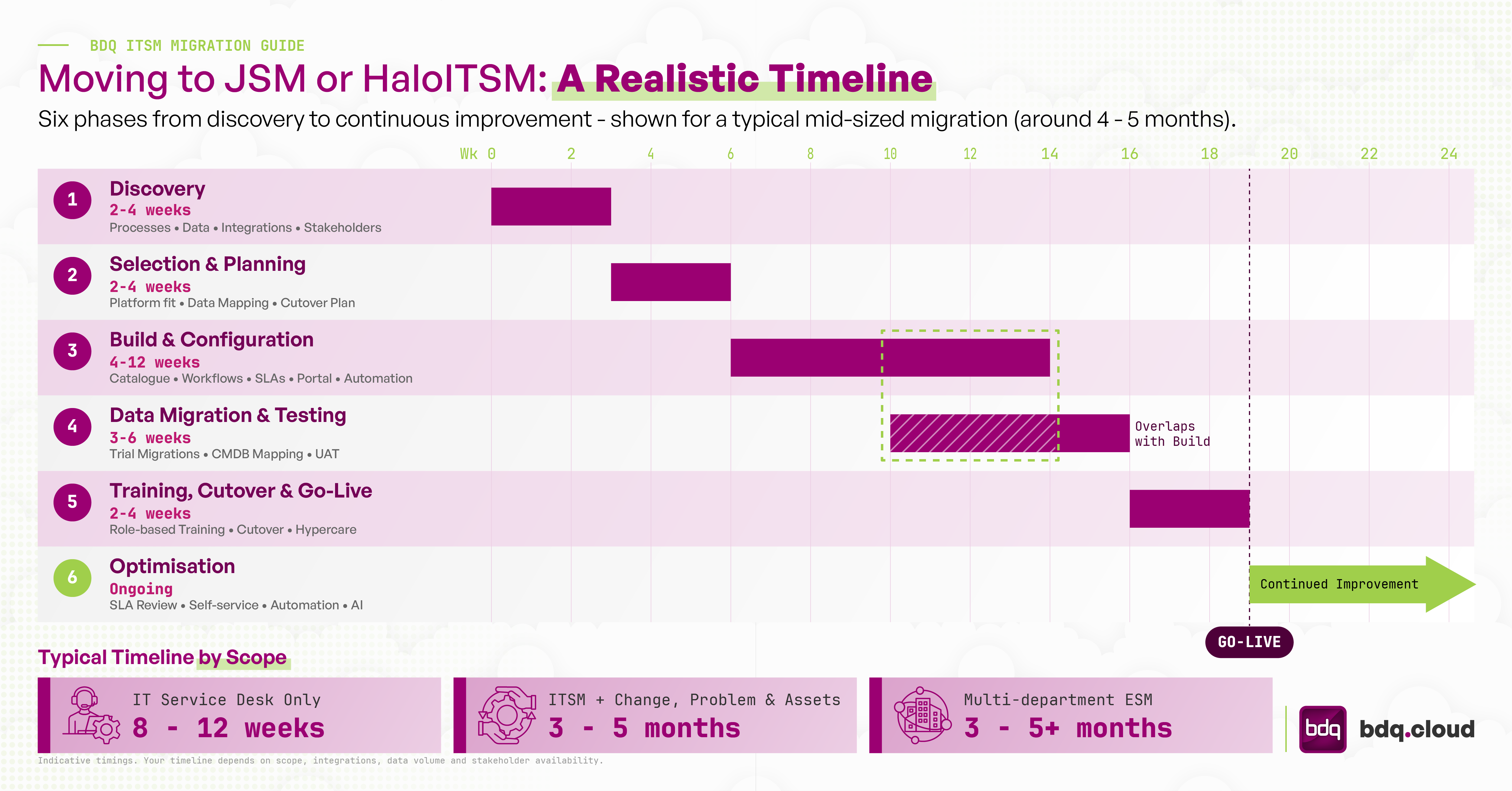 Phase 1: Discovery (2–4 weeks)
Discovery gives you a clear picture of what you have today and what you need tomorrow. It typically covers:
Process inventory: incident, request, change, problem, knowledge and asset management, and how each is configured today
Data audit: ticket history, the knowledge base, the configuration management database (CMDB) and user records
Integration mapping: identity providers, monitoring tools, HR systems, development tools and anything else that exchanges data with your service desk
Stakeholder interviews: agents, approvers, service owners and end users
A useful principle here is to migrate requirements, not configuration. Platforms built over many years often contain workflows created for needs that have since changed. Discovery is your chance to decide what to keep, what to simplify and what to retire.
If you haven’t yet settled on a destination, this is where you compare options against your requirements. Jira Service Management and HaloITSM are both strong ITIL-aligned platforms, but they suit different organisations.
Jira Service Management often suits organisations that:
Already use Jira and Confluence for software development or project work
Want close collaboration between IT operations and development teams
Plan to extend service management to HR, facilities or legal through the Atlassian Cloud platform
Want to use Assets for CMDB and Rovo, Atlassian’s AI, across their tools
HaloITSM often suits organisations that:
Want a dedicated, all-in-one ITSM platform with broad out-of-the-box functionality
Value straightforward agent-based licensing
Need strong built-in asset, contract and supplier management
Want a single platform that can grow into wider enterprise service management
With the platform chosen, planning produces a migration plan: data mapping, an integration plan, a cutover strategy, a testing approach and a communication plan. It’s also the right time to look at total cost of ownership, not just licence price. Our guide, The Real Cost of ITSM: What Should You Compare?, covers this in detail.
This is usually the longest phase. Your new platform is configured to match your agreed design:
Service catalogue and request types
Workflows, SLAs and approval rules
Agent roles, permissions and queues
Self-service portal and knowledge base structure
Automation rules and notifications
Integrations with your identity provider, monitoring and other business systems
Build in short iterations and show progress to service owners regularly. Early feedback avoids rework later.
Data migration runs alongside the build. Key decisions include:
How much ticket history to migrate. Many organisations bring over open tickets and one to three years of closed history, and archive the rest in a searchable format to meet audit and retention needs.
Knowledge articles. Migration is a good time to review, merge and retire out-of-date content. A well-kept knowledge base also makes AI features on either platform far more effective.
CMDB and asset data. Map configuration item classes and relationships carefully. For JSM this means mapping to Assets object schemas. For HaloITSM it means mapping to asset types and fields.
Expect at least two trial migrations before the final run. Each trial validates the data mapping, shows any gaps and gives you an accurate estimate of how long the cutover will take. Migration tools are available, including apps on the Atlassian Marketplace and integration partners in the HaloITSM ecosystem, but their output still needs careful testing.
Testing should include user acceptance testing (UAT) with real agents working real scenarios, integration testing and a dress rehearsal of the cutover.
People make or break a service desk migration. Plan for:
Role-based training for agents, team leads and administrators, delivered close to go-live so it sticks
End-user communication about the new portal, new email addresses and how to get help
A clear cutover plan, usually over a weekend or quiet period, with a final data delta, DNS and email changes, and integration switchover
Hypercare: two to four weeks of extra support after go-live to resolve issues quickly and build confidence
Many organisations keep read-only access to their previous platform, or a searchable archive, for a set period after go-live for reference and compliance.
Go-live is a milestone, not the finish line. In the first three to six months, review:
SLA performance and ticket volumes against your baseline
Self-service adoption and knowledge base usage
Automation opportunities based on real ticket data
Where AI-assisted triage, summarisation or virtual agents could reduce workload
Ongoing platform administration, through an in-house team or a managed service, keeps the platform matched to how your organisation works as it grows.
Discovery gives you a clear picture of what you have today and what you need tomorrow. It typically covers:
Process inventory: incident, request, change, problem, knowledge and asset management, and how each is configured today
Data audit: ticket history, the knowledge base, the configuration management database (CMDB) and user records
Integration mapping: identity providers, monitoring tools, HR systems, development tools and anything else that exchanges data with your service desk
Stakeholder interviews: agents, approvers, service owners and end users
A useful principle here is to migrate requirements, not configuration. Platforms built over many years often contain workflows created for needs that have since changed. Discovery is your chance to decide what to keep, what to simplify and what to retire.
If you haven’t yet settled on a destination, this is where you compare options against your requirements. Jira Service Management and HaloITSM are both strong ITIL-aligned platforms, but they suit different organisations.
Jira Service Management often suits organisations that:
Already use Jira and Confluence for software development or project work
Want close collaboration between IT operations and development teams
Plan to extend service management to HR, facilities or legal through the Atlassian Cloud platform
Want to use Assets for CMDB and Rovo, Atlassian’s AI, across their tools
HaloITSM often suits organisations that:
Want a dedicated, all-in-one ITSM platform with broad out-of-the-box functionality
Value straightforward agent-based licensing
Need strong built-in asset, contract and supplier management
Want a single platform that can grow into wider enterprise service management
With the platform chosen, planning produces a migration plan: data mapping, an integration plan, a cutover strategy, a testing approach and a communication plan. It’s also the right time to look at total cost of ownership, not just licence price. Our guide, The Real Cost of ITSM: What Should You Compare?, covers this in detail.
This is usually the longest phase. Your new platform is configured to match your agreed design:
Service catalogue and request types
Workflows, SLAs and approval rules
Agent roles, permissions and queues
Self-service portal and knowledge base structure
Automation rules and notifications
Integrations with your identity provider, monitoring and other business systems
Build in short iterations and show progress to service owners regularly. Early feedback avoids rework later.
Data migration runs alongside the build. Key decisions include:
How much ticket history to migrate. Many organisations bring over open tickets and one to three years of closed history, and archive the rest in a searchable format to meet audit and retention needs.
Knowledge articles. Migration is a good time to review, merge and retire out-of-date content. A well-kept knowledge base also makes AI features on either platform far more effective.
CMDB and asset data. Map configuration item classes and relationships carefully. For JSM this means mapping to Assets object schemas. For HaloITSM it means mapping to asset types and fields.
Expect at least two trial migrations before the final run. Each trial validates the data mapping, shows any gaps and gives you an accurate estimate of how long the cutover will take. Migration tools are available, including apps on the Atlassian Marketplace and integration partners in the HaloITSM ecosystem, but their output still needs careful testing.
Testing should include user acceptance testing (UAT) with real agents working real scenarios, integration testing and a dress rehearsal of the cutover.
People make or break a service desk migration. Plan for:
Role-based training for agents, team leads and administrators, delivered close to go-live so it sticks
End-user communication about the new portal, new email addresses and how to get help
A clear cutover plan, usually over a weekend or quiet period, with a final data delta, DNS and email changes, and integration switchover
Hypercare: two to four weeks of extra support after go-live to resolve issues quickly and build confidence
Many organisations keep read-only access to their previous platform, or a searchable archive, for a set period after go-live for reference and compliance.
Go-live is a milestone, not the finish line. In the first three to six months, review:
SLA performance and ticket volumes against your baseline
Self-service adoption and knowledge base usage
Automation opportunities based on real ticket data
Where AI-assisted triage, summarisation or virtual agents could reduce workload
Ongoing platform administration, through an in-house team or a managed service, keeps the platform matched to how your organisation works as it grows.
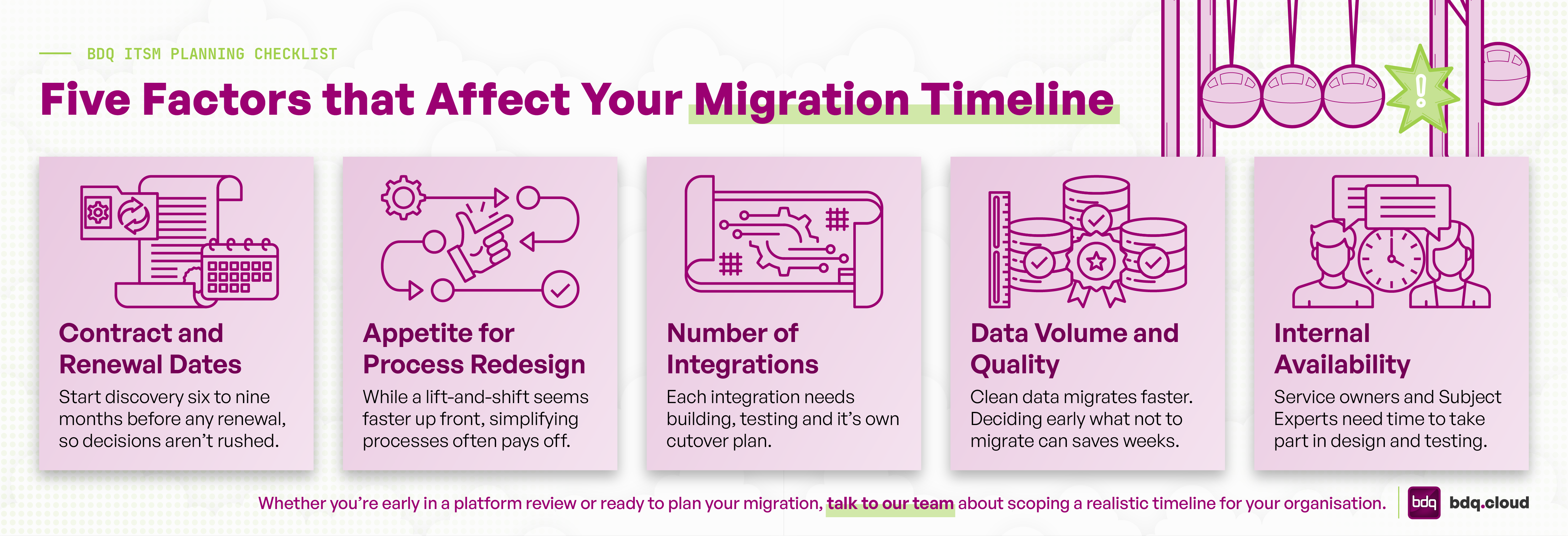
Contract and renewal dates. Start discovery six to nine months before any renewal, so decisions aren’t rushed.
Process redesign appetite. Lifting processes over as they are is faster up front. Simplifying them often pays off over time.
Integration count. Each integration needs building, testing and a cutover plan.
Data volume and quality. Clean data migrates faster. Deciding early what not to migrate saves weeks.
Internal availability. Service owners and SMEs need time to take part in design and testing.
Q. Can we migrate from ServiceNow to Jira Service Management without losing ticket history?
A. Yes. Ticket history, comments, attachments and related records can be migrated to JSM. Most organisations migrate a defined period of history and archive older records to balance completeness with cost and timeline.
Q. Is HaloITSM or Jira Service Management better for a ServiceNow migration?
A. Neither is better in every case. JSM suits organisations invested in the Atlassian ecosystem or with close IT and development collaboration. HaloITSM suits organisations looking for a dedicated, all-in-one ITSM platform. A structured requirements review is the best way to decide.
Q. Can we run both platforms in parallel?
A. Yes, though usually only briefly. Long parallel running adds cost and confuses agents. A short overlap, or read-only access to historical data, is more common.
Q. What’s the minimum realistic timeline?
A. For a small IT service desk with few integrations, eight weeks is achievable with prompt decisions and available stakeholders.
BDQ has helped more than 180 organisations in over 30 countries implement, migrate and optimise their service management platforms. As a Solution Partner of Atlassian, HaloITSM, Freshworks and others, we give vendor-neutral advice that starts with your requirements, not a preferred product. We’re also a G-Cloud 15 approved supplier for UK public sector organisations.
Whether you’re early in a platform review or ready to plan your migration, talk to our team about scoping a realistic timeline for your organisation.
Book a 30-min consult
Tell us roughly what you’re facing. We’ll come back within one business day with thoughts, references, and a sense of whether we’re a good fit.
More reading
Help desk vendor lock-in can make switching feel risky. Learn what creates lock-in and how to plan a smoother ITSM migration.
Read story → Atlassian,The licence price is only part of the story. Learn how to assess the true lifecycle cost of an ITSM platform, from pricing models to exit co
Read story → ITSMCherwell end of life is 31 December 2026. Learn what happens next, compare Cherwell alternatives and plan a fast, low-risk ITSM migration.
Read story →We use cookies to keep the site working and to power features like our live chat. Analytics are cookieless. See our privacy policy.