


Overview
The Easy Email Attachments for Service Desk app by BDQ is a drop-in replacement for notification emails when comments are added or edited in Atlassian's Jira Service Management Server. The emails sent by the app include the attachments added to those comments as email attachments, rather than links to the Jira Service Management portal.
Easier email conversations, faster resolutions, and customers do not have to remember yet another login.
*Video may contain references to Jira Service Desk instead of Jira Service Management.
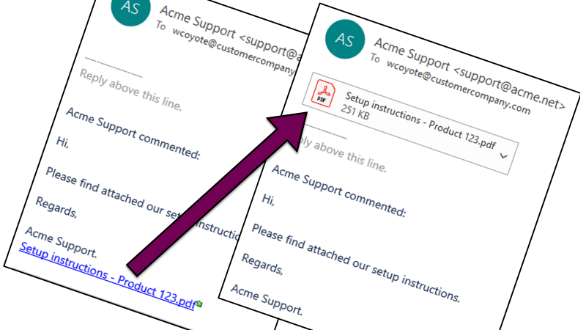
Email attachments instead of links!
Customers receive real attachments in their email clients - no more portal links! Notifications work as customers expect, and Jira instances behind the firewall can send attachments to external users.
Easy to setup
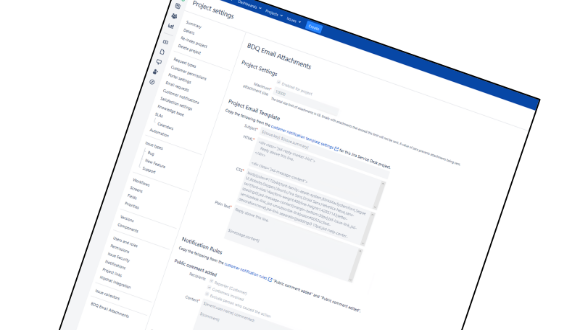
Get up and running in minutes - easy to trial. Simply copy and paste the current configuration. Configuration is done within the Project Settings page for each Service Desk project.
Agents work as usual
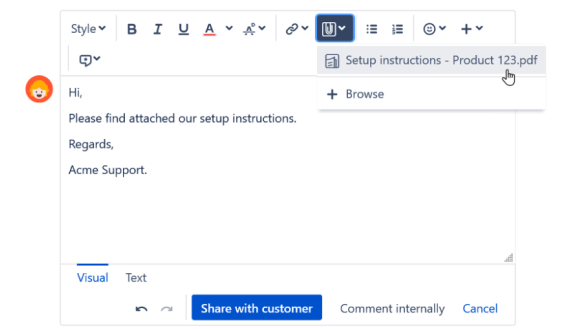
There are no changes to Jira Service Management's comment interface. Agent's can drag in issue attachments as normal, and no additional training is required.
Getting Started
Installing, setting up and using Easy Email Attachments for Service Desk is a breeze. But incase you have concerns, we recorded a short video to help you.
You can also use the link below to review the "Getting Started" documentation.
Getting Started summary
*Video may contain references to Jira Service Desk instead of Jira Service Management.
Easy Email Attachments for Service Desk
Easy to trial - get 30 days free when you download from the Atlassian Marketplace
App support & resources
Need a hand? Raise a ticket via the BDQ Support Portal, explore Managed Support for flexible expert help, or read more customer stories.


