Field Service Management for Jira and JSM · Docs
Issue View
The Issue View allows users to manage visits directly from a Jira issue. From here, visits can be created, viewed, updated, scheduled, and tracked througho...
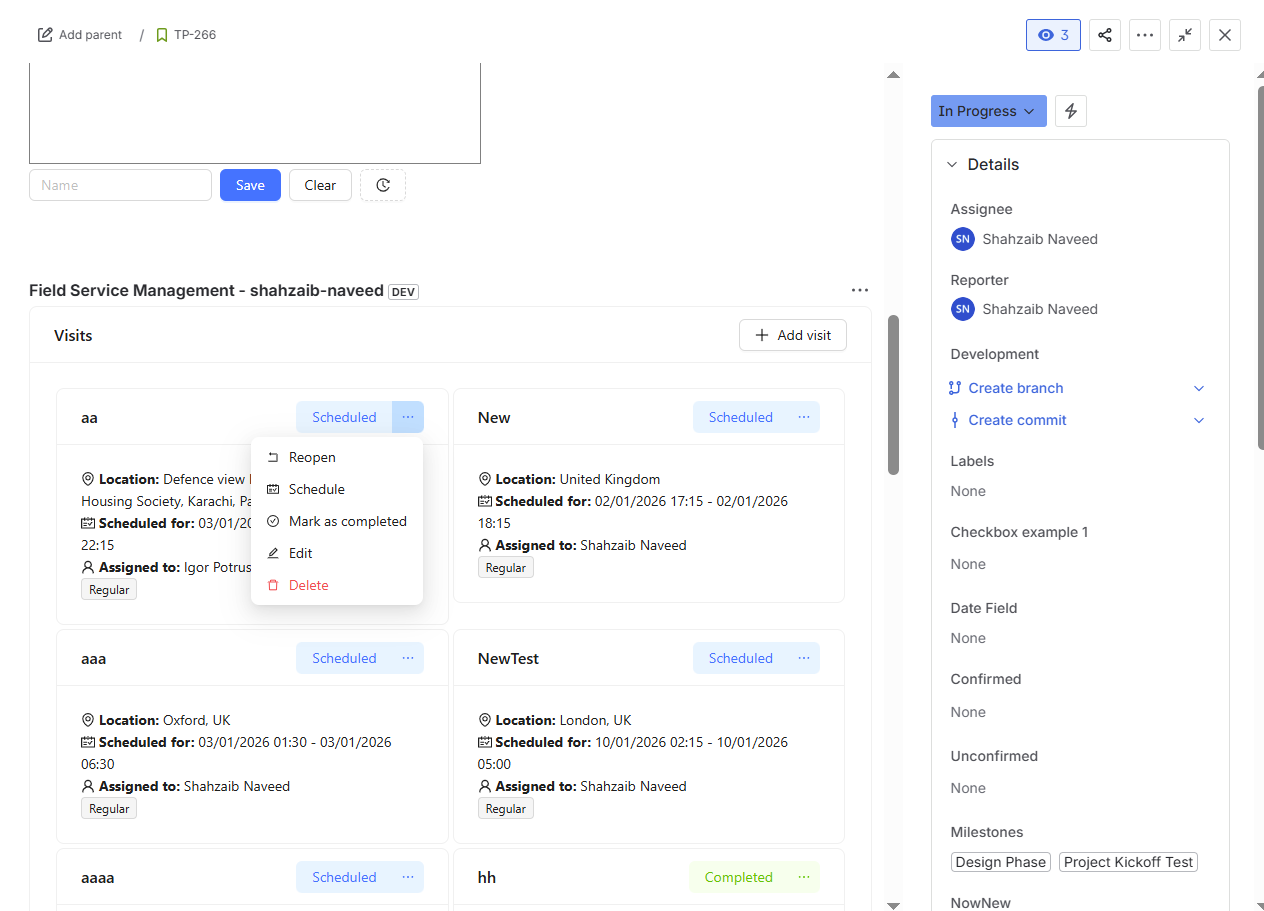
The Issue View allows users to manage visits directly from a Jira issue. From here, visits can be created, viewed, updated, scheduled, and tracked throughout their lifecycle.
Accessing the Field Service Management Panel
To open the Issue View:
Navigate to the desired Jira issue.
Click on Apps in the issue panel.
Locate Field Service Management.
Click on it to add and open the app within the Jira issue.
Once added, the Field Service Management panel becomes available on the issue.
Managing Visits from the Issue View
Within the Field Service Management panel, you can perform the following actions:
Add a New Visit
Create a new visit linked to the current Jira issue.
The visit will automatically be associated with this work item.
Required visit details can be entered using the visit form.
View Visits
See a list of all visits created for the issue.
Each visit displays key details such as title, status, dates, and location.
Edit Visit Details
Update visit information such as title, type, location, skills, and notes.
Changes are saved and reflected immediately.
Schedule a Visit
Schedule Visit Action:
Opens a scheduling form.
Assign an assignee to the visit.
Set the start date and time and end date and time.
Once scheduled, the visit status is updated to Scheduled.
Mark Visit as Done
Mark as Done Action:
Marks the visit as completed.
The visit status is changed to Completed.
Completed visits remain visible for reference.
Reopen a Visit
Reopen Action:
Reopens a completed visit.
The visit status is changed back to Pending or Scheduled, depending on the visit details.
Allows further updates or rescheduling if required.
Delete a Visit
Permanently removes the visit from the issue.
This action cannot be undone.