

PDF Automation for Jira and JSM · Docs
PDF Export
Overview
Last updated 14 October 2025
Overview
The PDF Export feature allows users to generate and download a formatted PDF version of any Jira issue.
This exported PDF includes key issue information, selected custom fields, and layout elements configured under Project Settings.
Steps to Export the PDF
Follow these simple steps to export a Jira issue as a PDF:
Select the Issue
Open the issue you want to export in Jira.
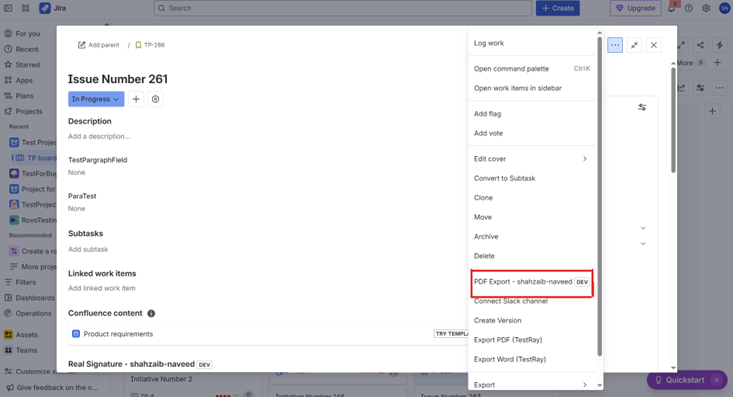
Select the Action Menu
Click the three dots (···) option located in the issue’s action bar.
From the dropdown list, choose the PDF Export action.
Automatic Export Process
The application will fetch all relevant issue data.
A PDF file will be generated based on your configured project settings.
The PDF will automatically begin downloading to your device.
📑 PDF Content Structure
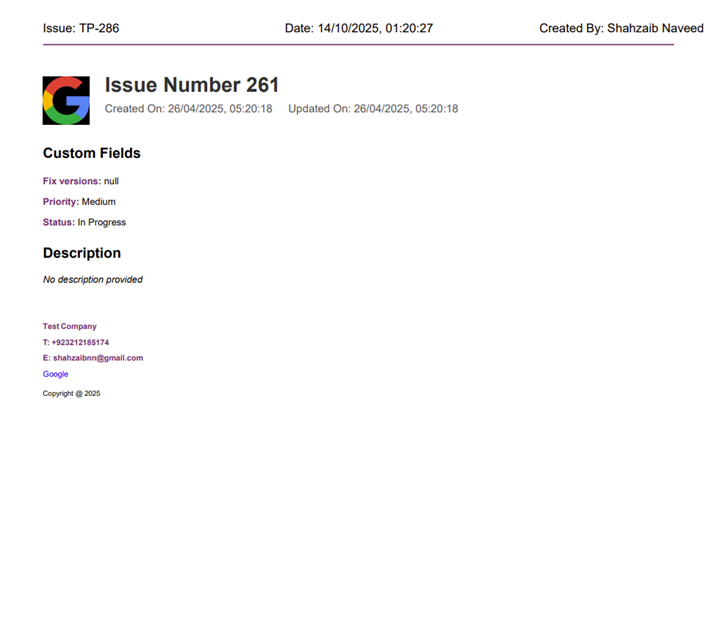
The exported PDF contains the following sections:
Header
Displays the Issue Summary or Title.
Includes Created Date, Updated Date, and Created By information.
Shows the Company Logo that was configured in Project Settings.
Issue Details
Displays all core issue information such as description, type, and key.
Includes all Custom Fields that were selected in the Project Settings → Add Custom Fields section.
Ensures field labels and values are neatly formatted for clarity.
Footer
Appears at the bottom of every exported PDF page.
Displays the footer information configured in Project Settings, including:
Company name
Contact details (Tel, Email)
URL and URL Text
Footer text (e.g., copyright or disclaimer)
✅ Summary
Users can export any Jira issue to a professionally formatted PDF in just a few clicks.
The PDF layout and content automatically adapt based on configurations in Project Settings.
Each exported PDF includes a header, issue details with custom fields, and a footer for consistency across documents.